
Rec Room Design System
A design system that turned UI creation from a bottleneck into a multiplier across 11 teams

My Role
I first joined Rec Room as the sole UX/UI designer, supporting 8+ product teams. I quickly recognized that the real problem wasn’t workload; it was a structural bottleneck. Design was a dependency on every team’s timeline.
I shifted from producing UI for individual teams to building the system that let others produce it themselves, growing a centralized team focused on design infrastructure that served every product team in the company.
- Partnered with engineering to build a UI framework in Unity, designed for easy onboarding so any engineer could start using it quickly
- Drove adoption team by team. PMs and non-UX/UI designers went from zero to building mockups independently within ~1 week
- Established governance: design reviews, office hours, exception-handling process
My Team

UI creation couldn’t keep pace with the shipping cycle
Rec Room’s growth depended on rapid experimentation. Teams shipped features weekly to find what resonated with players. But with only 2 interface designers serving 8+ teams, every feature requiring UI was bottlenecked on design capacity.
The design system was the lever: a shared component library, design language, and documentation framework that let PMs, game designers, and engineers build production-quality UI without always needing an interface designer in the loop.
With only 2 interface designers, game designers and PMs resorted to screenshotting existing UI and drawing over it in PowerPoint to create “specs”
Every team built UI differently, leading to a fragmented player experience and recurring usability issues that required rework.
UI was built from scratch every time, adding roughly 2 weeks on top of core feature work
Designed to serve every role
Not every team had an embedded designer, so the system needed to be usable by anyone: PMs, game designers, and engineers alike, without becoming a new bottleneck.
For Designers
- Have a unified design language and principles that ensure ecosystem-wide consistency
- Have flexible frameworks with clear guidelines that empower innovation without reinventing foundations
For Product Managers
- Enable more product roles to quickly create mockups and prototypes without always relying on designers
- Reduce UI creation as the bottleneck on production timelines
For Engineers
- Reducing development time and ambiguity through clearer design handoffs
- Faster onboarding for new engineers into UI development
Principles
Three principles anchored the system's architecture and informed how every component, token, and guideline was crafted.

A single, reliable foundation aligns design and engineering, eliminating ambiguity and fostering seamless collaboration.

A modular, resilient system that evolves systematically without breaking what already works.

Reusable patterns enable product teams to create features independently, accelerating delivery while maintaining consistency.
Support Model
The design system was built to handle the majority of day-to-day UI needs. For everything else, we created tiered support that scaled with project complexity.
PR reviews: required early, optional once teams were ready
Initially, we reviewed every PR to ensure correct implementation. As teams demonstrated they understood the system, we made reviews optional. This built trust over time and removed us as a bottleneck.
Office hours + work sessions
Teams with specialized needs submitted interface requests or brought them to office hours. For smaller tasks, we'd work directly with the design owner in the session or schedule a focused work session.
Embed model for large project like first-party games
For bigger efforts, like designing UI for a new first-party game, we embedded directly with the team. This gave them dedicated design system support while keeping the system's standards intact.
Foundation
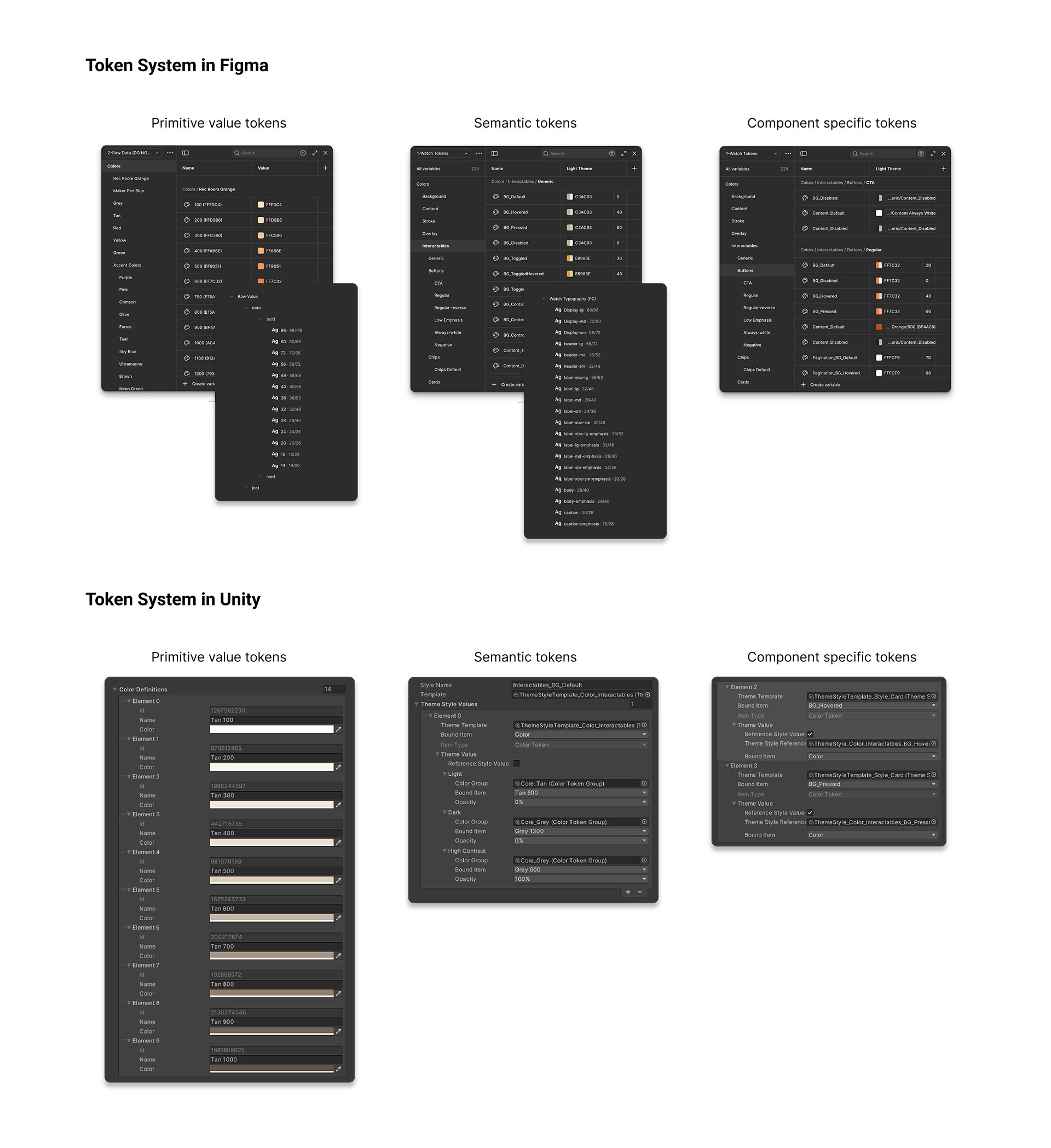
We use a 3-tier token architecture (primitive → semantic → component) for color, typography, spacing, and sizing. This layered structure allows updates at any tier to cascade predictably, enabling foundation changes without breaking existing components.

Component Library

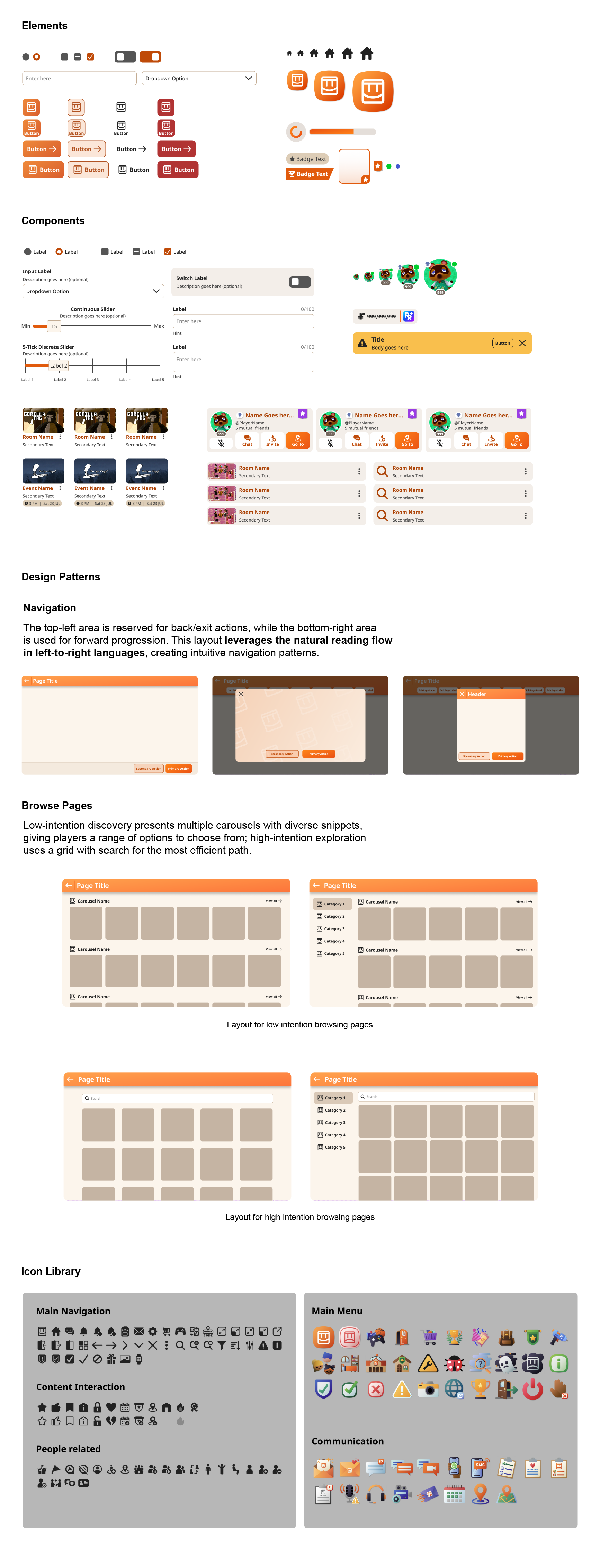
The component library follows an atomic design methodology with three tiers:
Elements: foundational building blocks (e.g., buttons, inputs)
Components: assembled UI units built from elements
Design Patterns: groups of components that solve recurring product needs
This structure makes the system easy to maintain and scale: designers have clear guidelines for maintaining and expanding the system, while product teams can build features independently by following established patterns.
Documentation
Each component includes its own design guidelines and implementation documentation. Designers and PMs learn what to use and when, while engineers learn how to adapt UI prefabs in Unity confidently and efficiently.
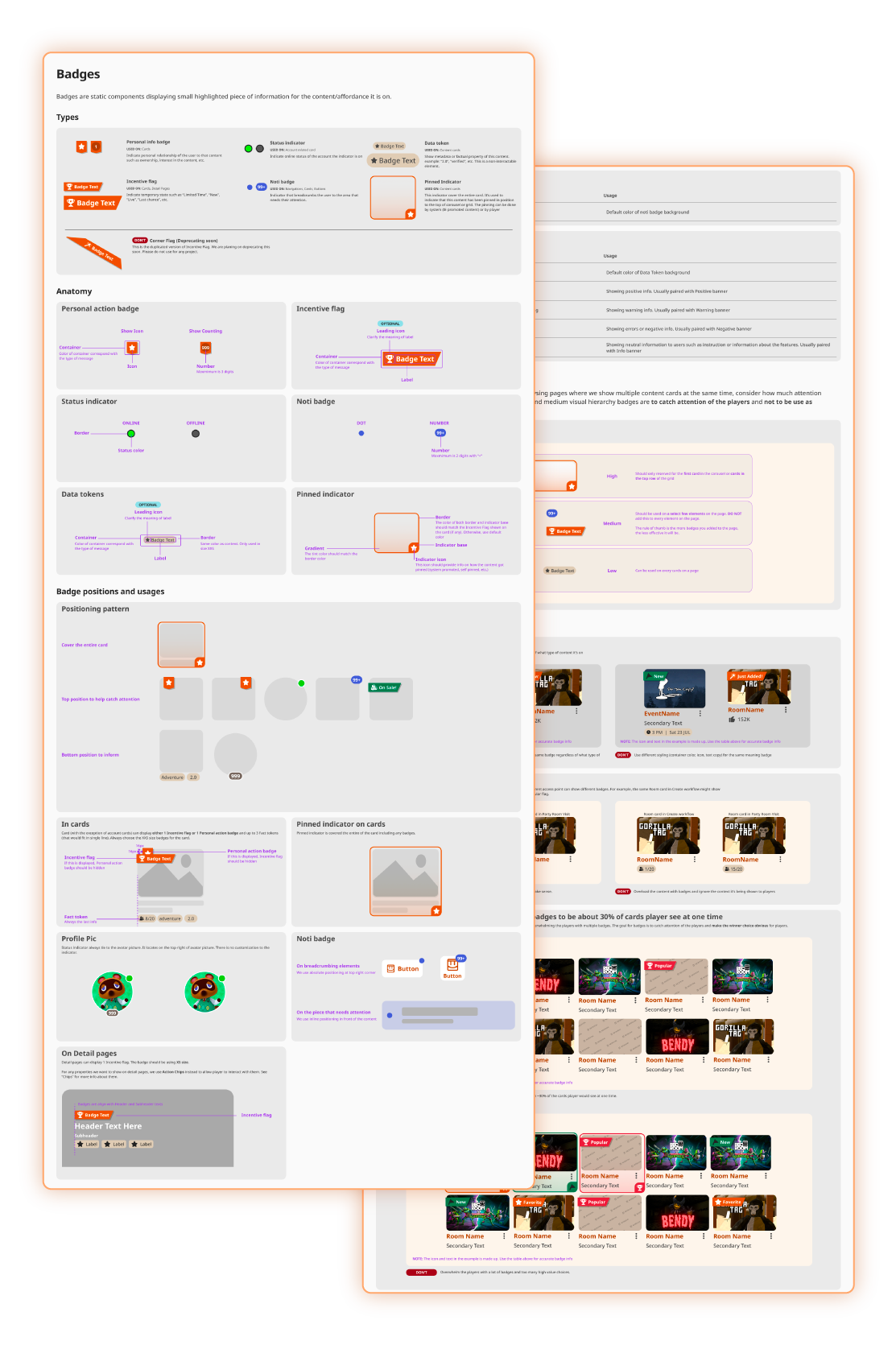
Design Best Practices
Guidelines cover anatomy, usage rules, and positioning patterns, giving designers and product teams the context they need to make the right call without guesswork.
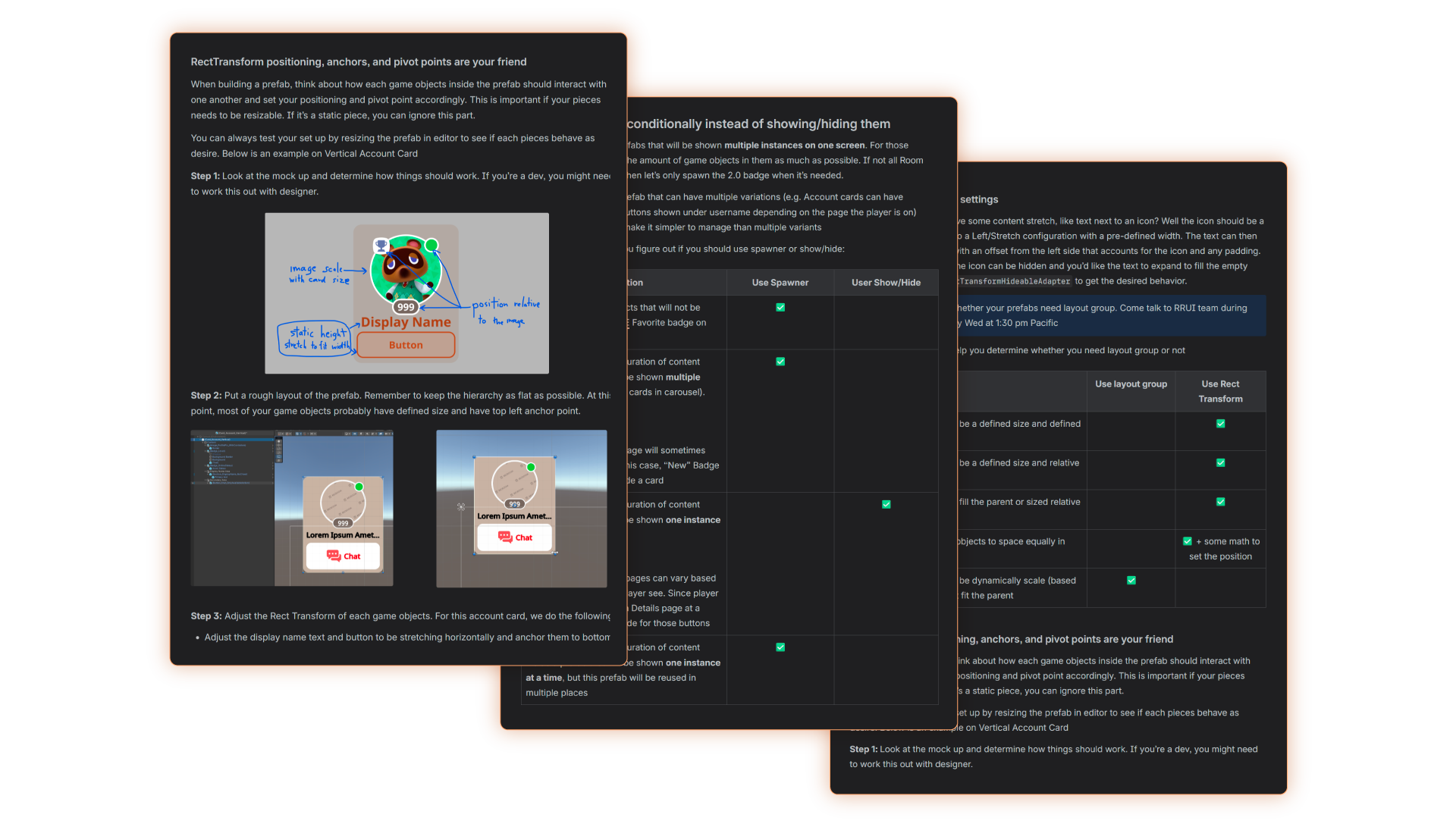
Implementation Documents
Implementation docs ensure design specs are faithfully translated into Unity while keeping features performant.
Each component includes step-by-step instructions and checklists, helping engineers confidently adapt UI prefabs.
From Figma to Unity, seamlessly
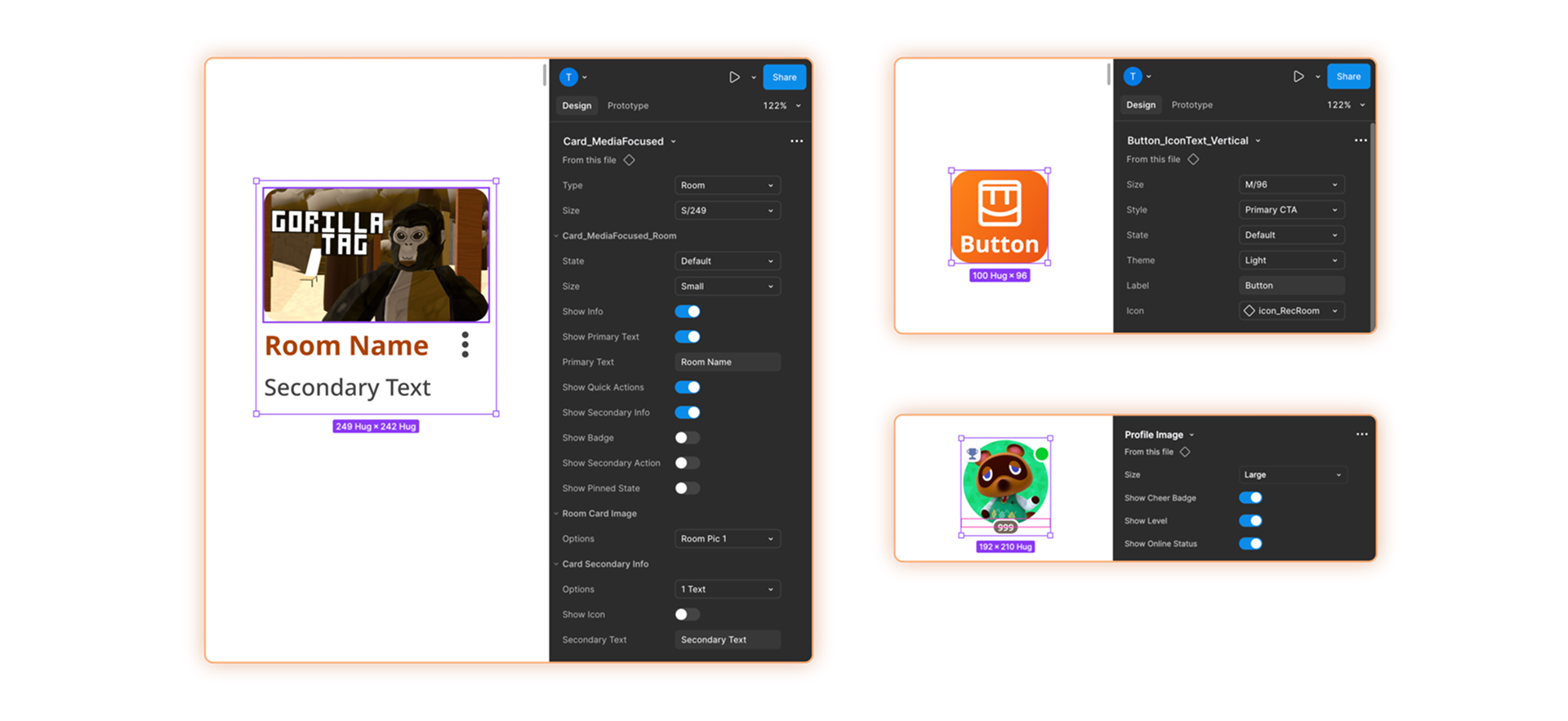
Adjustable Components
Flexible Figma components make it easy for product teams to prototype and tailor mockups to their feature needs without heavy design support.
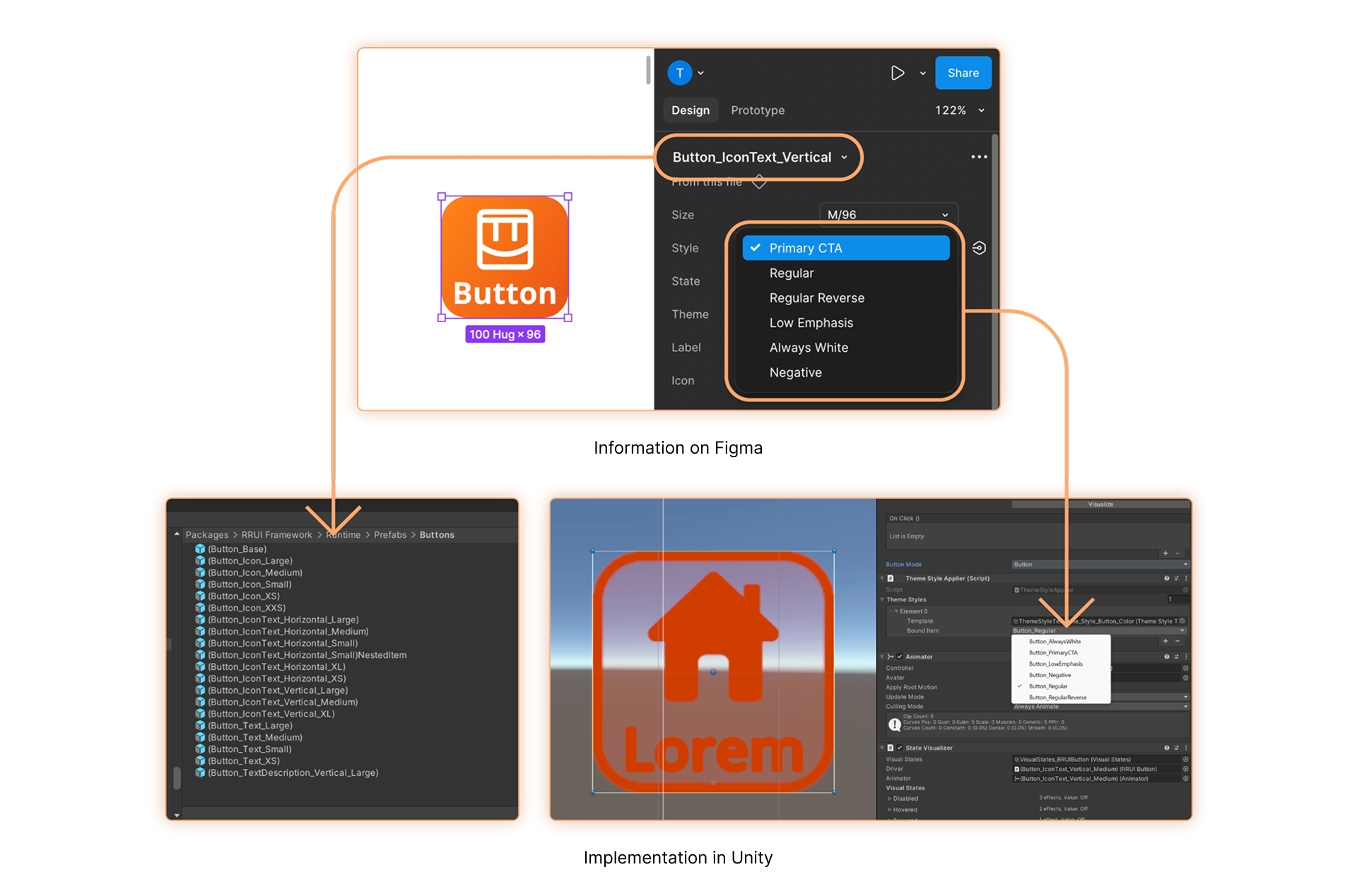
Pre-setup Prefabs
Mirrored Unity prefabs match Figma specifications in sizing and styling, letting engineers quickly assemble pages by selecting coordinated components instead of rebuilding from scratch.
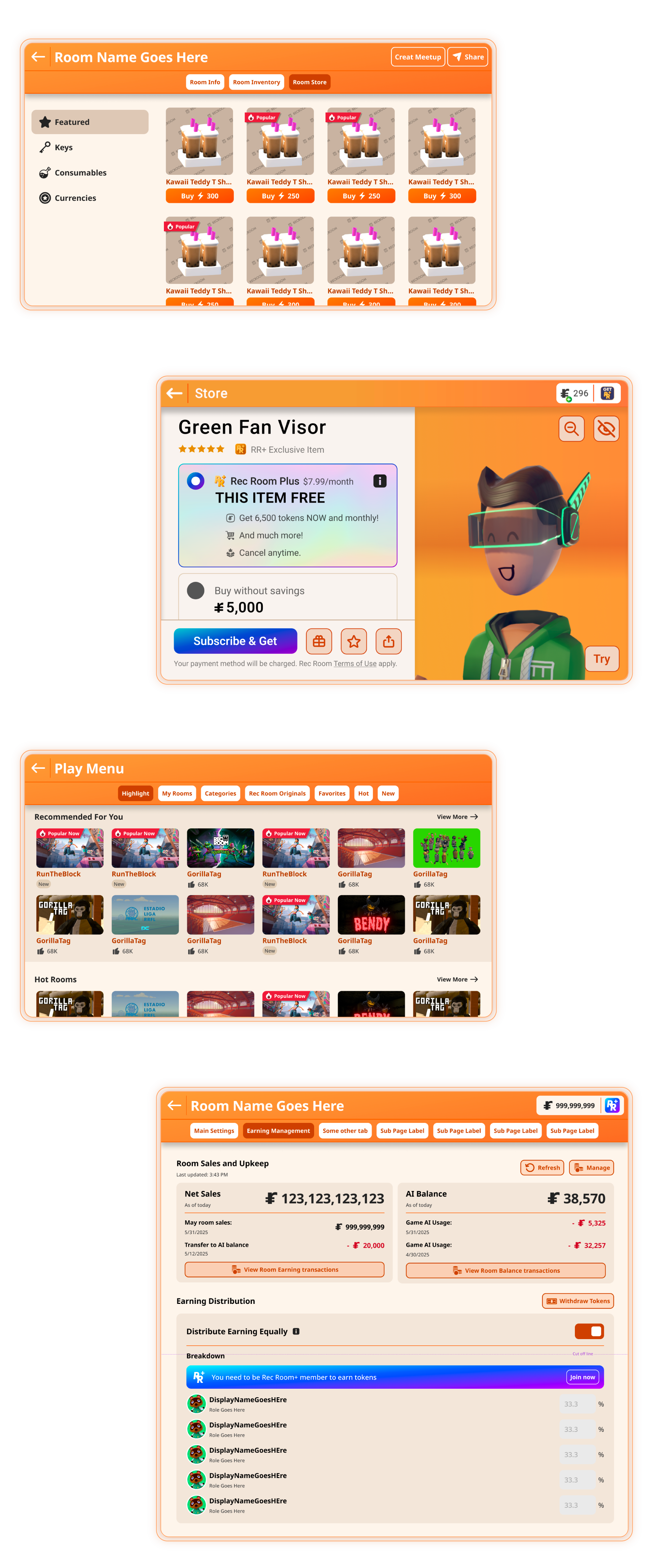
Page Design Examples
Real pages across product areas, including work by PMs and game designers building independently with the system.
From bottleneck to multiplier
~80%
adoption across the company, with 11 teams actively using the library
10+
PMs and game designers shipping UI independently
3-5 days
to build feature UI, down from ~2 weeks

What I learned along the way
1. The best help is making yourself unnecessary
As a designer, my default was to jump in and deliver. But every time I did, I reinforced the bottleneck. The real shift was reframing my role from "how do I help this team ship faster" to "how do I make it so this team never needs to wait on me again."
2. Withstand the change
At Rec Room, features get cut, scoped down, or reworked after every test cycle. Most design system thinking emphasizes growth, but I found it equally important to design for reduction. Components need to scale down or be removed without breaking what surrounds them. A system that only grows well but can't shrink cleanly becomes brittle the moment the product changes direction.